Why account settings?
When getting data from your ERP or uploading a file of your accounting data, data also includes all the work your accountant have put into placing each cost in different defined financial categories (General Ledgers or financial accounts). Even through this is not directly translated into the Scope categories of the GHG protocol, it's a great starting point for including the right data into the right structure.
However, each company is different and account costs differently. That is why we have created account settings, a way for you to manage the translation between financial accounting and carbon accounting!
This is a much requested feature from all accountants and CFOs.
Standard Account Settings
We have build in a common set of often used accounting standards. This feature allows you to view and customize the rules for how transactions are handled across different account codes. Supported accounting standards now include:
- IFRS (International Financial Reporting Standards)
- NGAAP (Norwegian Generally Accepted Accounting Principles)
- KOSTRA (Norwegian Municipality-specific standard)
BAS 2020 (Svenska kontoplan)
DSK (Dansk Standard Kontoplan)
Plan Kont (Polish Chart of Accounts)
Tilikartta (Finish Chart of Accounts)
These accounting standards are maintained and updated by Position Green.
Custom Account Rules
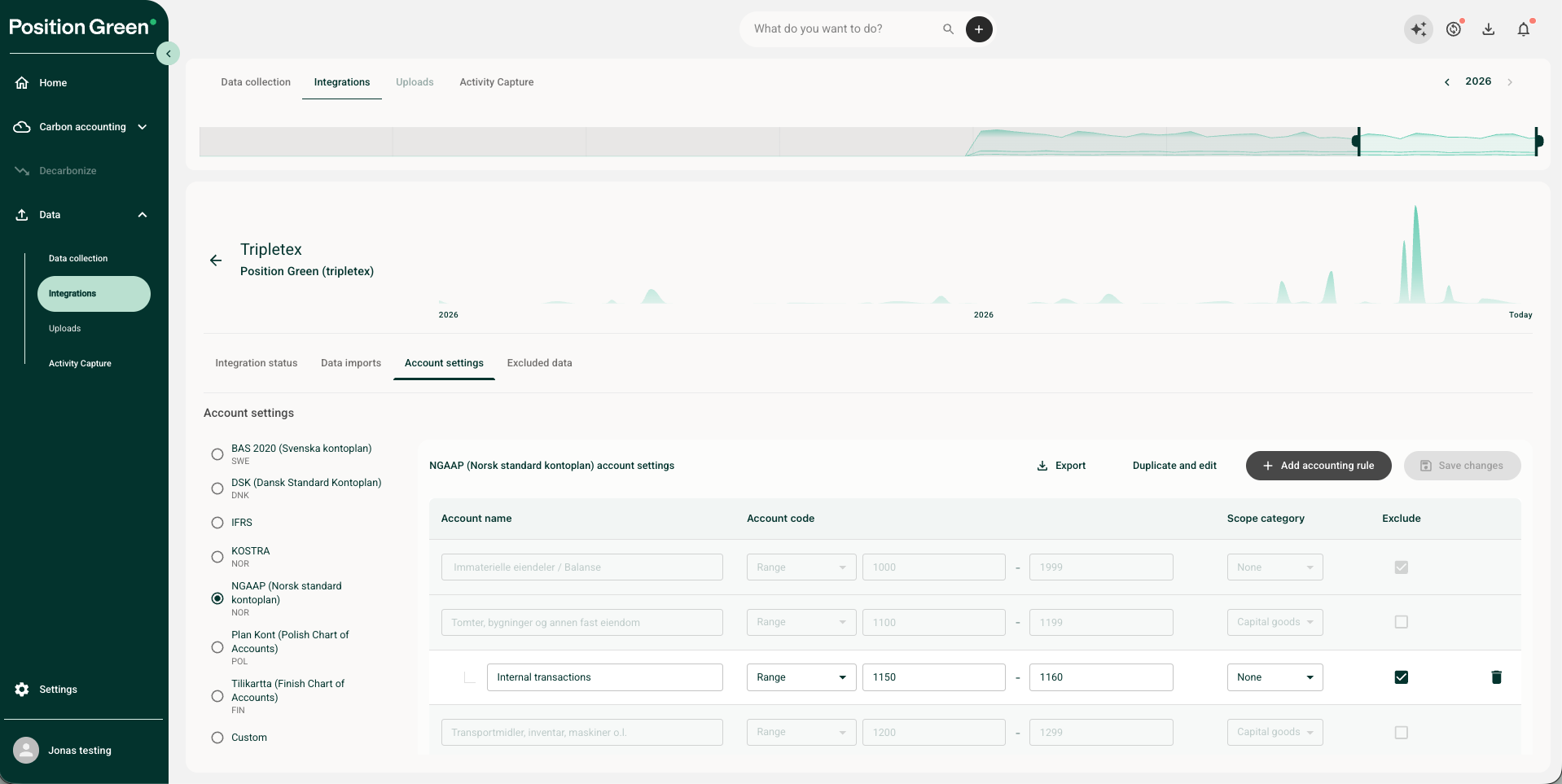
You can tweak the standard rules by inserting your own defined account codes into our standard. These will override the Position Green accounting rules, and is a good way to separate certain account codes that you use for specific purchases.
Example: Company X account based on NGAAP, but use account 6201 (Electricity) for transferring electricity bills internally between departments. As these transactions are purely financial, and the total electricity bills are already included in account 6200, they set up 6201 to be excluded from their carbon accounting.
Custom Templates
If you use an unsupported chart of accounts or want to maintain these rules yourself, you can "Create new template" to build your accounting rules from scratch. These settings apply across all direct software integrations as well as manual uploads (SAF-T files and Excel spreadsheets).
Note that account settings does not change which emission factor is used for emission calculations, only whether it is included in your carbon accounting and which category it gets placed in. Emission calculation is done either activity based from invoice data or spend based from supplier data, as explained in our methodology.
Account Code Documentation & Audit Trail
To improve audibility, you can view account codes on individual transactions and document excluded items:
- View the total amount excluded during data import (currency-neutral).
- Inspect the specific account code linked to each imported transaction.
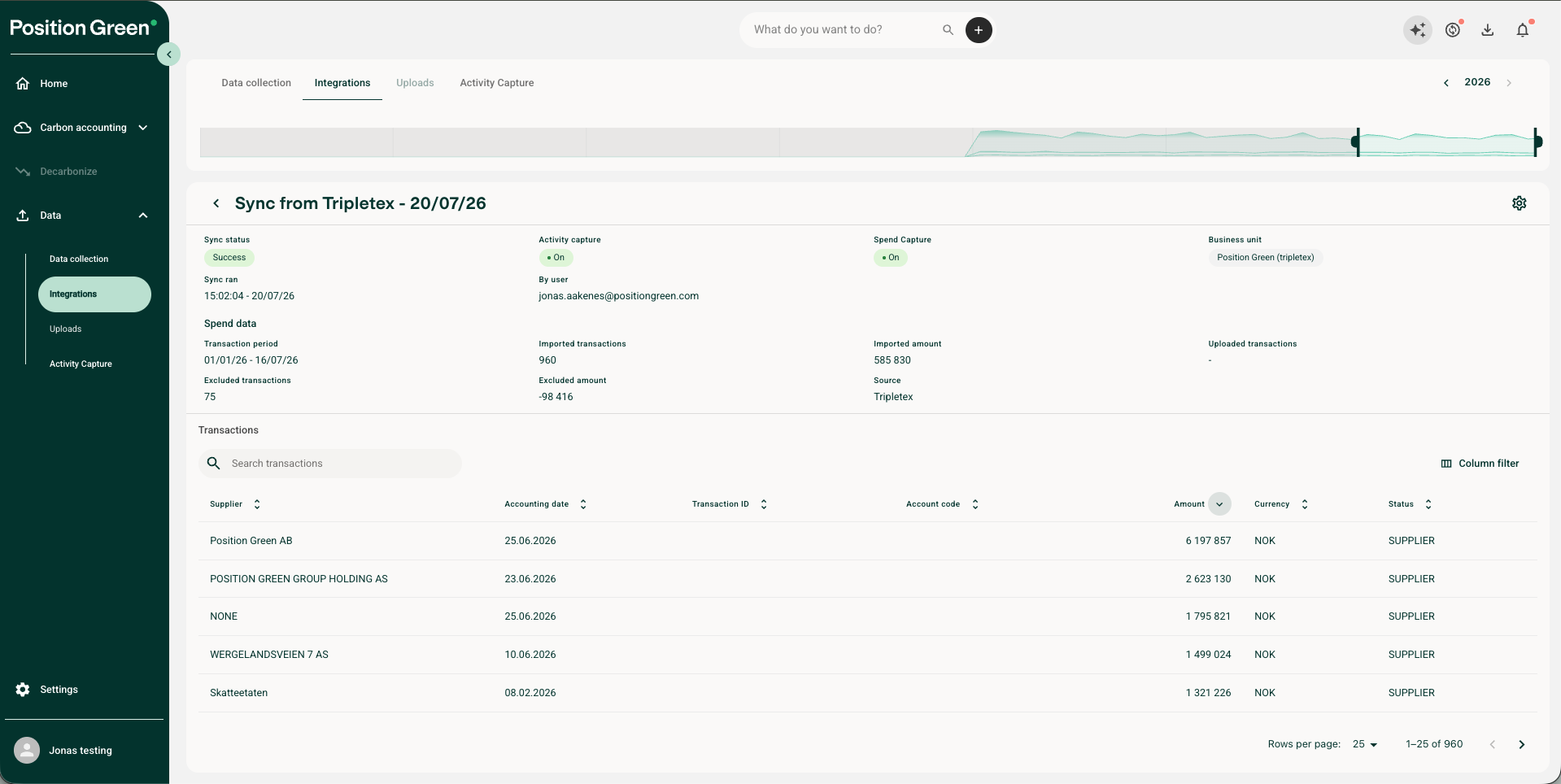
Note that account settings only is operational when data comes in from an integration or an upload. Changing the account setting does not change the historical data that is currently in your carbon accounting, it only filters and categorizes the data the next time you upload data.
Contact Position Green Support
If you run into any issues or have questions regarding these settings, contact your Position Green onboarding representative for guidance or troubleshooting support.
Was this article helpful?
That’s Great!
Thank you for your feedback
Sorry! We couldn't be helpful
Thank you for your feedback
Feedback sent
We appreciate your effort and will try to fix the article